Remote Work
Online Jobs for Students in the Philippines: 12 Flexible Roles With No Experience Needed
12 flexible, beginner-friendly online jobs Filipino students can do with a laptop and internet — pay from $2–$20+/hr and no experience required.
22 min read

Yes - you can earn online as a student in the Philippines even with no job history. This guide points to 12 entry-level roles that often start around $2 to $10+ per hour, with some AI-related work listed higher, and most only need a laptop, internet, and basic English.
Here’s the short version:
- If you need fully flexible work, I’d look at data entry, transcription, AI data annotation, search engine evaluation, and microtasks
- If you’re okay with more live interaction, I’d check online tutoring, customer service, and some VA roles
- If you want to build samples while earning, I’d focus on content writing, social media, or entry-level graphic design
- If your internet is unstable, I’d skip jobs that rely on live calls
- If a job asks for upfront fees, unpaid full tests, or early ID/bank details, I’d move on
The 12 roles covered are:
- Virtual Assistant
- Online Tutor
- Data Entry Clerk
- Social Media Assistant
- Content Writer
- Customer Service Representative
- Transcriptionist
- AI Data Annotator
- Search Engine Evaluator
- Microtask Worker
- Community Moderator
- Entry-Level Graphic Designer
Most student-friendly jobs share four traits:
- Flexible schedule
- Simple equipment needs
- Beginner-friendly training
- Low live-call demand
That matters because a job can say “flexible” and still expect fixed hours. If it requires you to log in from 9:00 a.m. to 6:00 p.m., it may not fit student life at all.
HOW TO Earn Extra Income Online While Studying as a Teen or Student in the Philippines
sbb-itb-3690fed
Quick Comparison
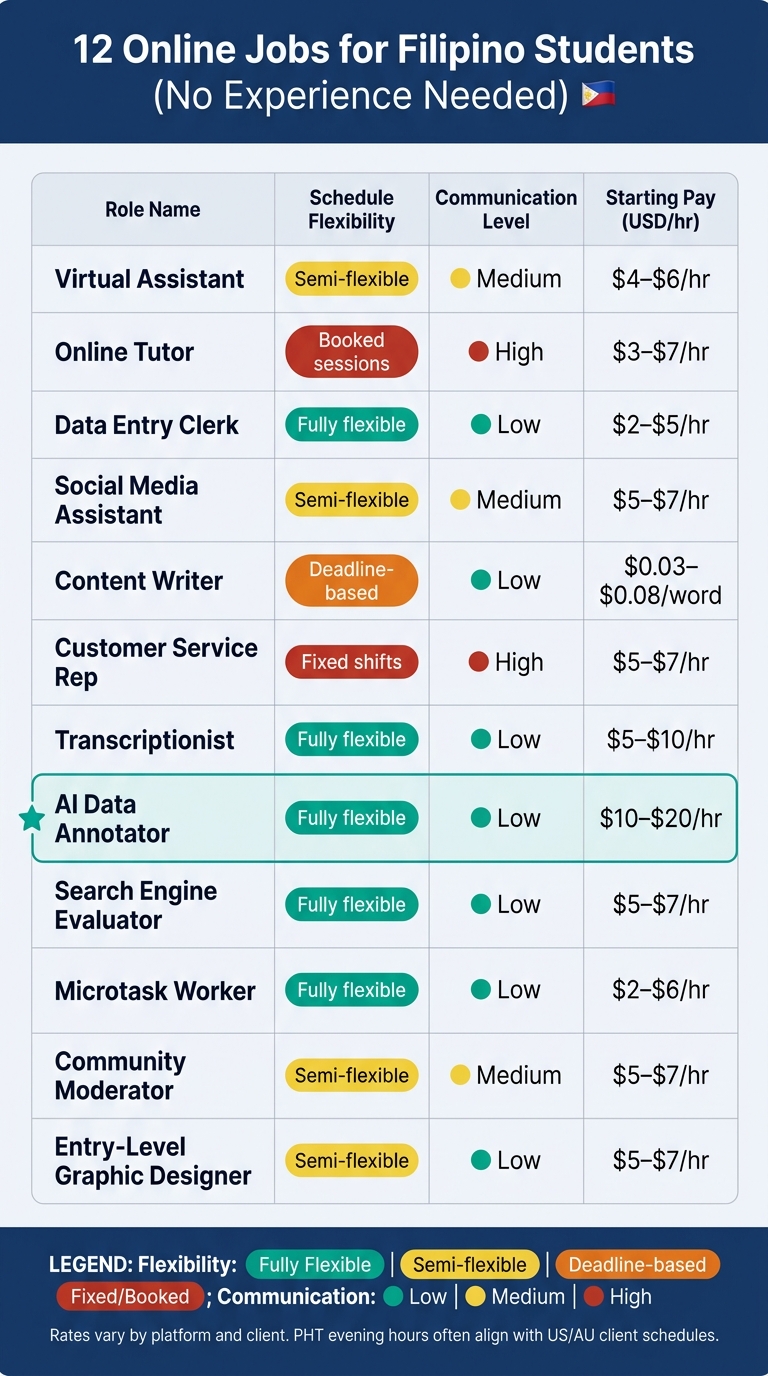
12 Online Jobs for Students in the Philippines: Pay, Schedule & Skills Compared
| Role | Best For | Schedule | Starting Pay |
|---|---|---|---|
| Virtual Assistant | Admin tasks, organization | Semi-flexible | $4–$6/hr |
| Online Tutor | Strong subject skills, speaking | Booked sessions | $3–$7/hr |
| Data Entry Clerk | Accuracy, typing | Flexible | $2–$5/hr |
| Social Media Assistant | Canva, posting, replies | Semi-flexible | $5–$7/hr |
| Content Writer | Writing, research | Deadline-based | $0.03–$0.08/word |
| Customer Service Rep | Live support, English | Fixed shifts | $5–$7/hr |
| Transcriptionist | Listening, typing | Flexible | $5–$10/hr |
| AI Data Annotator | Detail-focused task work | Flexible | $10–$20/hr |
| Search Engine Evaluator | Research, judgment | Flexible | $5–$7/hr |
| Microtask Worker | Short tasks, spare time | Flexible | $2–$6/hr |
| Community Moderator | Rules, written replies | Semi-flexible | $5–$7/hr |
| Entry-Level Graphic Designer | Canva-based visuals | Semi-flexible | $5–$7/hr |
Bottom line: I’d pick the role based on your class load first, pay second. A lower-paying job you can keep during midterms is often a better choice than a higher-paying one that wrecks your schedule.
What Makes an Online Job Student-Friendly
Use four filters to judge whether a remote job fits student life: schedule, equipment, onboarding, and communication. These give you a simple way to compare the 12 roles below.
Flexible scheduling is the biggest factor. The best student jobs are deadline-based. You finish a task or submit a deliverable by a set date, instead of logging in at a fixed hour. Content writing, data entry, transcription, and social media management often work this way. That setup makes life a lot easier. You can work between classes, fill short gaps in your day, or save bigger tasks for the weekend.
The opposite setup is much harder to manage. If a role has mandatory log-in windows or fixed shifts, it can clash with class schedules fast, even when the listing says it offers flexibility. One Philippines-focused resource puts it plainly: if a job post says flexible hours but also asks for 9:00 AM–6:00 PM availability or fixed shifts, it is not actually flexible for students.
Equipment requirements are the next filter. Most beginner-friendly online jobs only need a laptop, stable internet, and a headset. Some microtasks and basic social media work can even be done on a smartphone. It also helps to think ahead. A backup connection, like mobile data or pocket Wi-Fi, can save you when the power cuts out or your internet drops.
Onboarding difficulty matters more than many students think. A good listing usually says things like "no experience needed", "training provided," or "open to beginners." That is a green light for first-time workers. On the other hand, jobs that expect you to figure out everything on your own from day one are often a rough start.
Then there is communication demand. Chat- and email-based roles give students more control over when they reply. That makes them easier to fit around lectures, study time, and errands. Jobs that depend on live voice or video calls are harder to handle, especially if you do not have a quiet room or a fixed daily schedule. If a listing says "chat support", "email-based," or "minimal calls," that is usually a good sign.
| Quality | What to Look For | Red Flag |
|---|---|---|
| Scheduling | Deadline-based tasks, work anytime, part-time hours | Fixed shifts, mandatory log-in windows |
| Equipment | Laptop + internet + headset | High speed required |
| Onboarding | No experience needed, training or SOPs provided | Long skill lists, immediate full output expected |
| Communication | Chat/email-based, async updates | Frequent live calls, fixed voice shifts |
These filters make it much easier to sort through the roles in the next section.
1. Virtual Assistant
Virtual assistant work is a strong first pick for beginners because the tasks are usually short, repeatable, and easy to learn. Clients - often small business owners, solo entrepreneurs, content creators, e-commerce sellers, coaches, and other busy professionals in the U.S. or abroad - hire Filipino VAs to take repetitive admin work off their plate. If you want a flexible role that involves less admin work, the next option is online tutoring.
The easiest starting point is simple, repeatable work like sorting emails, updating spreadsheets, and helping with calendars. You’ll often use tools like Google Workspace, Slack, Zoom, Trello, and Asana.
Entry-level VA work usually starts at around $4–$6 per hour. For students, 10 to 20 hours a week is a common range.
U.S.-based clients often work on a different schedule, so live check-ins may land late in the evening in Philippine time. It helps to keep live calls limited and tell clients about exam weeks as early as you can. Next up is a role that leans more on subject knowledge than admin skills.
2. Online Tutor
Online tutoring is one of the easiest online jobs for students who want to make money from subjects they already know. Many beginners teach English, math, science, or ESL in live one-on-one or small-group sessions. The work usually involves explaining lessons, guiding practice, and checking homework.
To get started, you’ll need a laptop or desktop, stable internet, a headset, and a webcam. Most sessions happen on Zoom, Google Meet, Skype, or the platform’s own app. For teaching materials, Google Docs, Slides, PowerPoint, and Canva are usually enough. You can begin with free tools.
This job works well for students because the schedule is often flexible. Instead of taking fixed daily shifts, you can open only the time slots you’re free. Many student tutors work 5–15 hours a week, with sessions that last 30 to 60 minutes and fit around classes, evenings, or weekends. A lot of platforms also let you pause your schedule during exam weeks.
Pay for beginners often starts at around $3–$7 per hour on ESL platforms that hire Filipino tutors. If you don’t have formal teaching experience, a short sample teaching video, strong grades in the subject, past informal tutoring, and a clear application message can help a lot.
If live teaching doesn’t match your schedule, the next option is more task-based.
3. Data Entry Clerk
Data entry is one of the most common entry-level online jobs. The bar to start is fairly low, and accuracy matters more than deep tech skills. In most roles, you’ll enter customer or product details into spreadsheets or CRM systems, update records from PDFs or scanned forms, move data from one system to another, and clean up messy data by fixing obvious typos or making formats match.
It’s a solid pick if you want simple work you can learn fast and fit around school. If you’d rather spend less time in spreadsheets and more time communicating, the next role may suit you better.
Most jobs use Excel or Google Sheets, along with Drive for file sharing. Some employers also work in CRM tools like HubSpot or Salesforce. The skill that matters most is accuracy, followed by fast, steady typing. A good target is 50+ words per minute with strong accuracy. Free tools like TypingTest.com or Keybr can help you build speed.
This job also works well with student life because tasks are often batch-based and tied to deadlines, not live shifts. You can break the work into short blocks, like 1–2 hours after class or on weekends. For students in Philippine time (PHT), evening or late-night hours may also match business hours in the U.S. or Australia. That makes this role handy if you want work you can finish between classes without jumping on calls.
Beginners often earn $2–$5 per hour, or around $20–$50 per fixed project.
Be careful, though. Data entry job boards are packed with fake listings. A lot of them go after beginners who want fast cash. Real clients usually give clear instructions, sample entries, and outputs you can check. Walk away from offers that promise high pay for vague typing work or ask for money upfront.
If data entry starts to feel like the same thing over and over, the next role brings more day-to-day interaction.
4. Social Media Assistant
If you already spend time on social media, you’re not starting from zero. That gives you a nice head start.
As a beginner social media assistant, you’ll usually handle tasks like scheduling and publishing posts, replying to comments and messages, making simple graphics in Canva, and pulling basic performance data from Facebook Insights. Some roles also include managing DMs, moderating comments, and tracking basic leads. The big plus here is that the workflow is fairly easy to learn.
A common setup looks like this:
- Create graphics in Canva
- Schedule posts in Meta Business Suite
- Track results in Insights
It also helps to get comfortable with Canva for graphics and Meta Business Suite for scheduling and analytics. And it’s not just about those tools anymore. Employers now look for basic AI fluency too. If you can use ChatGPT or Claude for simple drafting, caption ideas, or light research, you may stand out from other beginners.
This role is a good fit for students who like deadline-based, slightly creative work. One thing to watch for: many clients operate on U.S. or Australia time, so evening or late-night PHT shifts are common. Most beginner roles are part-time, usually around 10–20 hours per week.
Entry-level pay usually falls between $5 and $7 per hour. If the role asks for more independence or research, pay can move closer to $7 to $10 per hour. If you lean more toward writing than visuals, the next role is content writing.
5. Content Writer
If writing comes more naturally to you than design work, content writing is a flexible way to earn money while building a portfolio. It’s a solid starting point because beginner work is usually pretty straightforward: blog posts, product descriptions, FAQ pages, captions, and short newsletters.
Most clients will give you a brief that covers the topic, word count, tone, and deadline. From there, your job is simple: research the topic, map out the piece, and write to match the brief.
For tools, you can keep it simple. Draft in Google Docs or Microsoft Word, then clean things up with a grammar checker like Grammarly or Hemingway. As you grow, it also helps to know WordPress and a bit of basic SEO, such as using headings well and writing meta descriptions.
One of the best parts? You can research, draft, and edit in small chunks between classes, as long as you hit the deadline.
Beginner rates often start around $0.03–$0.08 per word, or about $20–$40 for a 1,000-word article for work for international clients.
To get started, build a small Google Drive folder with 3–5 sample pieces on topics you already know well, like:
- study tips
- tech tools
- campus life
Clients often pick beginners based on samples, not past experience. That’s why a small, focused portfolio usually works better than a bigger folder filled with weaker pieces.
If you’d rather work in a role with more back-and-forth with people, the next job may suit you better.
6. Customer Service Representative
If you want a job that puts you in direct contact with people, customer service is a solid next step. It’s a strong entry-level pick for students who speak and type in English well, can stay calm when things get tense, and want work with clear scripts and steady routines.
The day-to-day work is pretty simple. You’ll answer customer inquiries, resolve questions, process returns or refunds, reset passwords, update account details, and log each interaction in a CRM or ticketing system. If live calls sound like a lot at first, chat or email support is often an easier place to begin.
The setup is basic: a laptop or desktop computer, a noise-canceling headset, and stable wired internet. Training usually covers scripts, ticketing tools, and escalation rules, so you’re not walking in blind.
The main scheduling plus is night work. Many Philippine CSR teams support U.S. clients, so shifts often fall in the evening or overnight in Philippine time. For students with daytime classes, that can make scheduling much easier. Entry-level remote CSR work for international clients usually pays about $5–$7 per hour or around $800–$1,100 per month at full-time hours, while mid-level roles can reach $7–$9 per hour.
That said, night shifts can wear you down fast during exam season. It helps to look for predictable part-time blocks and be upfront about your academic schedule before you start.
7. Transcriptionist
If you want quiet, task-based work with very few live calls, transcription is a good fit. A transcriptionist turns audio or video into text. Beginner jobs often include interviews, meetings, podcasts, and lectures. The work usually involves transcribing speech, tagging speakers, adding timestamps, and following style rules. More than anything, passing the screening test is what gets you in.
The bar to start isn't too high, but accuracy matters a lot. Entry-level platforms often ask for 40–60 WPM typing speed with 95%+ accuracy, and some want even tighter accuracy standards. Listening well matters just as much, especially when the audio has background noise, people talking over each other, or accents you don't hear every day. A transcription editor and noise-canceling headphones can make the job much easier.
For students, the big draw is the schedule. Many platforms let you pick up work when you want and turn it in within a 24–48 hour window. That makes it much easier to work around classes, study sessions, and the rest of your week.
Pay can be the tricky part. Most platforms pay by audio minute or audio hour, not by the time you spend working, so your hourly rate depends on how fast you can finish each file. Beginners often make about $5–$10 per working hour, and a 60-minute file can take around 6 hours when you're still getting up to speed. The good news is that your rate can improve as your typing and listening get better.
Before you apply, it helps to practice first:
- Get to at least 50+ WPM
- Transcribe short sample clips
- Learn how speaker labels and timestamps work
That prep can give you a better shot at passing the screening test, which most beginner platforms require. If you want another low-talk job with deadline-based work, the next role is AI data annotator.
8. AI Data Annotator
AI data annotation is a solid entry-level online job for students who can follow directions and catch small details. It works well with the same kind of student schedule as transcription, but with a more direct link to AI. The job is simple at its core: you label text, images, audio, or video so AI systems can learn patterns.
That can mean:
- tagging posts as positive, negative, or neutral
- drawing boxes around objects in images
- scoring AI answers for correctness
- classifying articles
- transcribing short clips
You don’t need a deep technical background to get started. Basic computer skills and patience usually matter most.
Another plus is flexibility. Most tasks are batch-based, so students can often work in short 30- to 60-minute blocks between classes or on weekends.
Pay depends on the platform and the task. Beginner rates often start around $10 to $20 per hour, while more specialized projects can pay $20 to $45 per hour. In plain English: if your work is accurate, you may get access to better-paying projects over time.
This role can also help you build useful job skills, including attention to detail, self-managed work habits, and a clearer sense of how AI training data gets made.
If you're looking for another beginner role with simple screening and flexible tasks, the next option is a natural fit.
9. Search Engine Evaluator
If you want a quiet, task-based job, search engine evaluation moves the work away from audio files and into search quality checks. The job is detail-heavy: you review search results and check whether they’re accurate and relevant. Beginner-friendly projects often focus on rating and reviewing results from different sources. Most entry-level roles don’t ask for past experience.
The main skills are simple but important: strong written English, internet research skills, and close attention to detail. It also helps to know Google Workspace, especially Docs and Sheets, and to have a laptop plus stable internet. That setup makes this role easier to fit around class hours, which is a big reason the schedule matters.
Many roles offer 10 to 20 hours per week, and some include overnight shifts to line up with clients in the U.S., Australia, or the U.K. That can make it much easier to work around classes while still gaining experience.
Entry-level pay usually starts at $5 to $7 per hour, while mid-level work can reach $7 to $10 per hour. For students, it can be a practical side income.
10. Microtask Worker
Microtask work is exactly what it sounds like: short, paid tasks that usually take just a few minutes. That can mean quick labeling, sorting, or verification work.
For students, the big draw is simple. The work has a low barrier to entry and a fast turnaround. You don’t need formal job experience to get started. In most cases, you just need basic English reading skills, attention to detail, and enough comfort with a phone or computer to move through tasks without getting stuck.
You also don’t need much gear. Most platforms only ask for:
This role works well for students because it slips into the day without much friction. Instead of setting aside one long work block, you can knock out tasks in short bursts. That makes it easy to use the in-between moments: a gap between classes, part of a commute, or a short break between study sessions.
The trade-off is pay. On general platforms, earnings are often low, usually around $2–$6 per hour, so it makes more sense as extra cash than as your main source of income.
If you’d rather have steadier interaction and less one-off task work, the next role is a better fit.
11. Community Moderator
If you want work that feels a bit more people-facing than microtasks, community moderation is a solid next step. The job is simple on paper: keep online spaces safe, useful, and on-topic. That usually means reviewing comments, removing spam, flagging rule violations, and answering routine questions.
The main skills here are strong written English, close attention to detail, and patience. You’ll often use tools like Discord, Slack, and Google Workspace.
For US- or UK-based clients, evening PHT hours line up well with their daytime schedules. That setup can leave your daytime open for classes, which is a big plus for students. Many roles also start at 10–20 hours per week, and some tasks are asynchronous. In plain English, you can work through a moderation queue without being stuck on a live shift.
Entry-level moderation usually pays $5–$7 per hour. If you work part-time, your total pay will be lower, of course, but it can still bring in steady income during the semester.
There’s another upside too: this work helps you build judgment, tone control, and policy enforcement skills. If you’d rather do something more visual, the next option is entry-level graphic design.
12. Entry-Level Graphic Designer
If you want something more visual than moderation, entry-level graphic design is a solid next move. It’s also a practical way in if you want design work but don’t have past job experience yet. A lot of beginner roles lean on Canva and simple brand assets, so you don’t need a deep design background to get started.
For many starter jobs, Canva is enough. Most beginner tasks focus on things like:
- Social posts
- Ad creatives
- Promo materials that fit the brand
- Simple slide decks
This kind of role is also a good way to turn class projects and internships into portfolio pieces.
You’ll usually use Canva for design, Google Workspace for file sharing, and basic AI tools for brainstorming. Some clients also mix design work with VA tasks, so it helps if you can handle simple admin work too.
This role often works well as a 10–20 hour per week job, and evening or overnight shifts are common for overseas clients. Entry-level pay often starts around $5–$7 per hour, while students with portfolio samples from school projects or internships may land $7–$11 per hour roles. If you want places to apply, the next section lists where students can find beginner-friendly remote work.
Where Students Can Find Beginner-Friendly Remote Work
After you pick a role, the next job is finding listings that actually work with a student schedule.
FindTalent.ph links businesses with verified Filipino remote workers in roles like virtual assistance, customer support, content creation, graphic design, and data work. Profiles go through identity verification before posting. Start by setting up your profile, adding your class hours, and uploading 2–3 short samples like a short essay, a Canva design, or a spreadsheet.
That matters more than most students think. A simple sample gives employers a fast way to see what you can do, even if you don't have job experience yet. The platform also uses AI matching to surface roles that fit your skills. From there, use your profile and samples to apply only to jobs that match your class load.
Once your profile is ready, use the platform's filters to narrow the list. Filter by schedule, skill, and work type so you can spot part-time roles that fit around your classes instead of trying to force your classes around a job.
Before you apply, slow down and check for warning signs. Watch for:
- Upfront fees
- Requests to complete full unpaid tests
- Early requests for sensitive data like bank details or government ID photos
It also helps to verify the employer's website, contact page, and email domain before you send anything over. If the company is using a free email account, that's a bad sign.
Quick Comparison of the 12 Roles
Use this table to compare each role by schedule, gear, and communication load before you apply.
| Role | Communication Level | Schedule Type | Equipment Needed | Starting Pay (USD) |
|---|---|---|---|---|
| Virtual Assistant | Medium | Semi-flexible | Laptop + stable internet | $3–$5/hr |
| Online Tutor | High | Booked sessions | Laptop, webcam, headset | $4–$10/hr |
| Data Entry Clerk | Low | Fully flexible | Basic laptop + stable internet | $2–$5/hr |
| Social Media Assistant | Medium | Semi-flexible | Laptop + scheduling tools | $3–$7/hr |
| Content Writer | Low | Semi-flexible | Laptop + word processor | $0.03–$0.08/word |
| Customer Service Rep | High | Fixed shifts | Laptop, headset, stable internet | $4.50–$7/hr |
| Transcriptionist | Low | Fully flexible | Laptop, headphones | $0.10–$0.60 per audio minute |
| AI Data Annotator | Low | Fully flexible | Basic laptop + internet | $3–$8/hr |
| Search Engine Evaluator | Low | Fully flexible | Basic laptop + internet | $4.50–$12/hr |
| Microtask Worker | Low | Fully flexible | Smartphone or laptop | $3–$8/hr |
| Community Moderator | Medium | Semi-flexible | Smartphone or laptop | $3–$7/hr |
| Entry-Level Graphic Designer | Low | Semi-flexible | Laptop + design software | $3–$8/hr |
A few trends jump off the page.
Roles with live interaction, like Online Tutor and Customer Service Rep, often pay more. The tradeoff is time. You’ll usually need to show up for booked sessions or fixed shifts.
On the other hand, low-communication jobs like Transcriptionist, AI Data Annotator, and Microtask Worker are easier to fit around classes. If your week changes a lot, that kind of setup can be a lifesaver. Pay is often lower, though.
The gear side is pretty simple. Most of these jobs just need a laptop and stable internet. A few ask for more: tutoring usually needs a webcam and headset, while graphic design calls for design software.
From here, the smart move is to match the role to your class load, how you like to work, and how much you want to earn.
How to Choose the Right Online Job While Studying
Use the table above to narrow your options. Then pick the job that matches your internet, class schedule, and income needs as a student with no experience.
Start with your internet connection. If it drops a lot, skip jobs that depend on live calls, like online tutoring and customer service. Go with async work instead, such as data entry, AI annotation, content writing, or transcription. You can finish those tasks and upload them when your signal is stable.
Next, match the job to your English skills. If speaking is your strong point, look at tutoring, customer service, and live VA work. If writing feels easier, content writing, data entry, search engine evaluation, and AI annotation are often a better fit.
After that, look at your semester calendar, not just your week. This is where a lot of students slip up. A job may seem fine on a normal Tuesday, then fall apart during midterms. Keep most weekday hours open for classes, and use evenings, weekends, or gaps between classes for work. If your schedule changes a lot, fully flexible jobs like microtasks, transcription, or data entry usually make more sense. If your routine is steady, a set VA shift may work better. That becomes even more important when exam weeks hit.
Income matters, of course. But while you're in school, steady pay can matter just as much. Ask yourself a simple question: do you need consistent weekly income, or can you deal with ups and downs? Customer service and VA roles usually offer more steady pay. Project-based work like writing, graphic design, and transcription can fit better during lighter weeks, but it can also become less reliable during exams.
Start with one role, not three. Give yourself the first month to see how the work fits around your classes. Keep screenshots, client feedback, and finished samples in one folder. That gives you a simple portfolio for future applications. Update it as you go, so you're not scrambling later.
Conclusion
You don’t need a long resume to start making money online as a student in the Philippines. But “no experience” doesn’t mean “no effort.” You still need to show up, learn fast, and do solid work.
The 12 roles above give you a practical place to begin. Start with the job that fits your class load, not just the one with the highest pay. After that, narrow it down based on your schedule, your strengths, and the rate.
These entry-level roles can grow into stronger freelance or remote careers over time. Small jobs help you build a track record. So keep it simple: start with one role, keep your first workload manageable, and protect time for classes. Pick one, apply, and build from there.
FAQs
Which online job is best for a busy class schedule?
General Virtual Assistant roles are often a good fit for students juggling classes, assignments, and everything else that comes with campus life.
The work is usually straightforward: inbox management, calendar coordination, and data entry. Since these tasks tend to follow a routine, they can often be handled during nonstandard hours instead of a strict 9-to-5 window.
That flexibility matters. Many clients need help across different time zones, which means you can often set a schedule around your academic availability. In many cases, that looks like part-time work of 10 to 20 hours per week.
What should I prepare before applying with no experience?
Show what you can do, not just what you know. Get comfortable with core tools like Google Workspace, Trello or Asana, and Slack. If you're going after a technical or creative role, build a portfolio with actual project work instead of just listing skills on a resume. That proof goes a lot farther.
Certifications, such as Google Workspace, can also help show your level of skill. On top of that, work on communication, attention to detail, and your ability to follow clear processes without missing steps. And on the practical side, make sure you have reliable internet and, if you can, backup power. When you're working remotely, those basics matter more than people think.
How can I avoid online job scams as a student?
Prioritize platforms that let you deal directly with the employer. That gives you a cleaner view of the role, the hiring steps, and the person on the other side. No middlemen. No vague handoffs. Just a clearer process from the start.
It also helps to do a quick credibility check. Look for a professional online presence, clear job details, and a hiring process that makes sense. If things feel sloppy or hard to verify, that’s usually a sign to slow down.
Stay away from jobs that ask for upfront payments or too much personal information before any contract is in place. That’s a red flag. Stick with secure, well-known payment and communication tools, and if something feels off, trust that instinct.
If you’re unsure, ask for a brief intro call first. You can also suggest a paid short-term trial before taking on a bigger commitment. It’s a simple way to test the working relationship without diving in blind.