Business Operations
Ultimate Guide to Managing Remote Teams Effectively
Systems, KPIs, and communication practices to run high-performing remote teams across U.S.–Philippines time zones.
16 min read

Managing remote teams across time zones, especially between the U.S. and the Philippines, can be challenging but achievable with the right systems in place. Here’s what you need to know:
- Cost Savings: Hiring in the Philippines can reduce labor costs by 60–70% compared to the U.S.
- Time Zone Management: Address the 12–16 hour gap with a 2–4 hour overlap for real-time collaboration.
- Key Tools: Use Slack for messaging, Asana for task tracking, Loom for async updates, and Notion for documentation.
- Clear Expectations: Define roles, responsibilities, and measurable outcomes to avoid confusion.
- Trust & Autonomy: Focus on deliverables, not hours worked, and foster open communication.
- Prevent Burnout: Set clear work hours, encourage breaks, and watch for signs of overwork.
- Cultural Awareness: Filipino professionals value harmony and recognition - be explicit about feedback and celebrate milestones.
- Hiring & Onboarding: Platforms like FindTalent.ph simplify recruitment. Offer structured onboarding with SOPs and backup plans for outages.
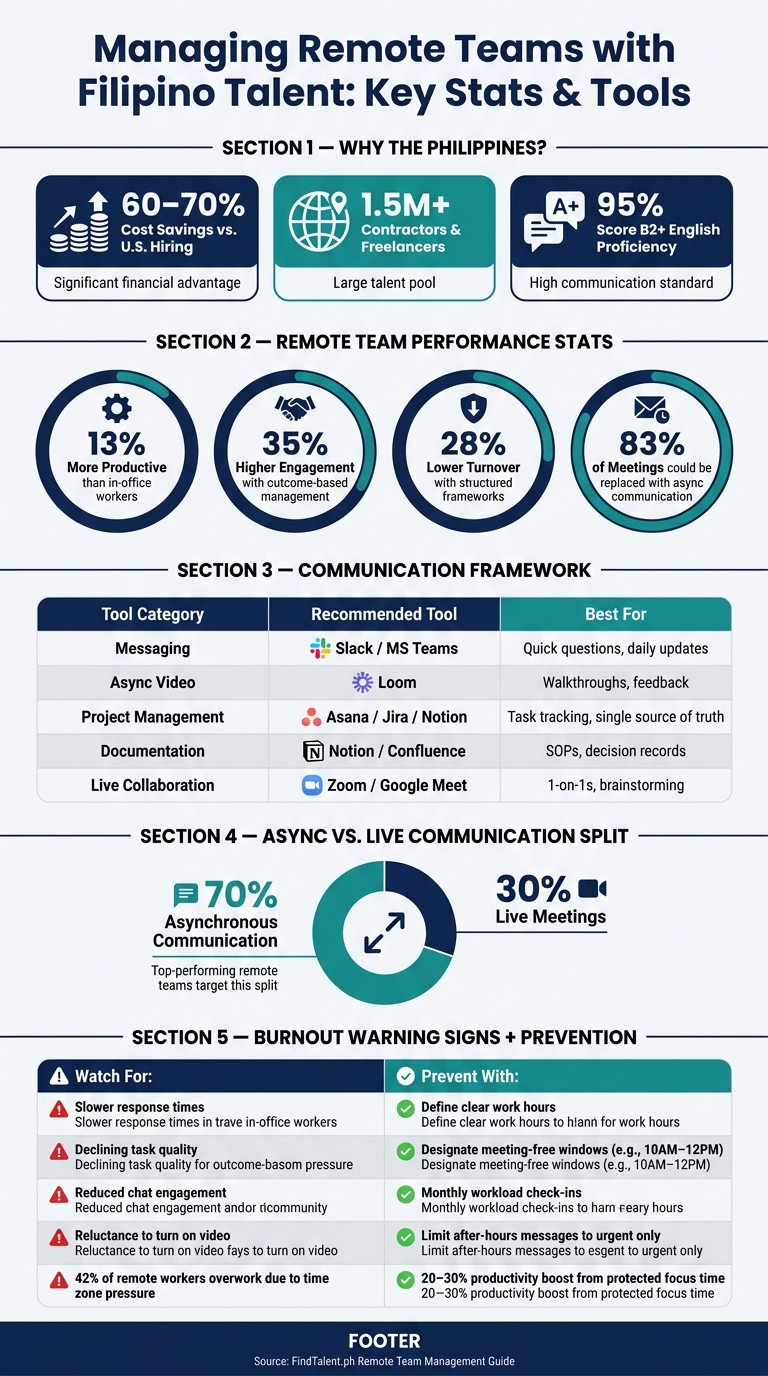
Remote Team Management: Key Stats & Tools at a Glance
The Ultimate Remote Team Guide: From Chaos to Cohesion
sbb-itb-3690fed
Core Principles of Remote Team Management
Running a successful remote team isn’t about working harder - it’s about having the right systems in place. Without clear structures, even the best teams can falter, leading to missed deadlines, duplicated efforts, and confusion over responsibilities.
Defining Roles, Responsibilities, and Expected Outcomes
Ambiguity is often a bigger challenge for remote teams than a lack of skills. When roles and responsibilities aren’t clearly defined, tasks can easily slip through the cracks. To avoid this, assign every task to a specific team member, complete with due dates and status updates in your project management tool. If it’s not logged, it might as well not exist.
Decision-making authority should also be crystal clear. Team members need to know which decisions they can make independently and which require approval. This clarity ensures work keeps moving, even across time zones. One-page SOPs with screenshots and step-by-step instructions can further reduce confusion and prevent reliance on memory.
From the start, set measurable and specific expectations. Vague goals like "work harder" don’t help. Instead, focus on tangible outcomes such as “50 data entries per day with 98% accuracy” or “publish three articles per week.” This approach keeps the emphasis on results, not just clocking hours.
Once roles and expectations are in place, the next step is creating shared norms to keep the team aligned.
Establishing Shared Team Norms
Shared norms are the glue that holds remote teams together, and they should be established early - ideally within the first two meetings. As Oliver Grant, Operations Writer at FounderOperator, puts it:
"The resilience of a remote team's culture is not a gradual evolution, but rather a deliberate construction, largely cemented by establishing shared norms and social connections within its initial two meetings."
Start by agreeing on how tools will be used, expected online hours, and response times. A good framework might include using Slack for quick questions, a project management tool as the central hub for tasks, and reserving video calls for more complex discussions or resolving blockers.
For teams spanning time zones, like U.S.–Philippines collaborations, establish a core overlap of 2–4 hours where both sides are online. This overlap allows for real-time communication while protecting the rest of the day for focused work. It’s worth noting that time zone challenges affect 19% of remote teams.
Here’s a quick look at tools that can help streamline communication and workflows:
| Tool Category | Recommended Tool | Primary Use |
|---|---|---|
| Messaging | Slack / MS Teams | Quick questions, daily updates |
| Async Video | Loom | Process walkthroughs, feedback |
| Project Management | Asana / Jira / Notion | Task assignments, single source of truth |
| Documentation | Notion / Confluence | SOPs, decision records, internal wiki |
With these norms in place, the focus shifts to building trust and empowering your team.
Building Trust and Giving Teams Autonomy
Micromanagement is a fast track to losing trust in a remote setup. Instead, measure outcomes - what gets done - rather than obsessing over when someone is online. Teams that focus on results report 35% higher engagement and 28% lower turnover. Daily updates summarizing completed work, plans for the next day, and blockers can provide the transparency needed without resorting to constant monitoring.
For teams with Filipino professionals, it’s especially important to create a culture where raising blockers feels safe. In a workplace culture that values harmony, team members might hesitate to highlight problems. Actively encouraging them to share unclear situations can foster trust and openness.
Another way to build trust is through regular 1-on-1 meetings. A 30-minute weekly check-in, led by the employee, is a great opportunity to identify issues early and strengthen relationships. Make it a priority to hold these meetings consistently - skipping two weeks in a row can erode their effectiveness.
These principles lay the groundwork for better communication, smoother collaboration, and higher productivity in remote teams spread across the globe.
Communication and Collaboration for Remote Teams
Even the best-organized teams can lose valuable time when communication isn’t clear. The key is using the right type of communication at the right moment.
Once your team has a solid structure and well-defined roles, the next step for remote work success is making communication and collaboration as effective as possible.
Creating a Clear Communication Framework
Every communication tool should have a specific purpose. If Slack becomes the go-to for both urgent questions and lengthy project discussions, chaos is inevitable. A communication charter - a concise document that outlines how each tool should be used and response time expectations - can eliminate confusion before it starts.
Organize communication channels by urgency and permanence. For example:
- Slack or Microsoft Teams: Ideal for quick, time-sensitive questions. Responses should generally come within two hours during work hours.
- Email: Best for formal or external communication, with a typical response time of 24–48 hours.
- Notion or Confluence: Use these platforms for storing information that needs to be referenced later, such as SOPs, project briefs, or important decisions.
Victor Hoang, Co-Founder of Rework, explains it well:
"Teams that communicate well don't use better tools than the teams that communicate poorly. They've decided, as a group, which tool handles which kind of communication, and they actually follow the decision."
When sending asynchronous messages, include all essential details: context, a clear request, relevant resources, a deadline (with a specified time zone), decision authority, and any expected follow-ups. This approach minimizes unnecessary back-and-forth and keeps the workflow moving, even with teammates in different time zones.
These practices help strike the right balance between live meetings and asynchronous updates.
Balancing Live Meetings and Async Updates
Top-performing remote teams aim for a 70/30 split between asynchronous and live communication. If your team spends more than 30% of its time in meetings, it’s worth reviewing which discussions actually need real-time interaction.
"If your team spends more than 30% of their time in meetings, they're not doing the work - they're talking about the work." - Anita Singh, Content Strategist, Zedtreeo
Reserve live meetings for high-priority situations like major decisions, brainstorming, one-on-ones, or conflict resolution. Tasks like status updates, assigning work, process overviews, and feedback should almost always be handled asynchronously. In fact, research shows that 83% of meetings could be replaced with asynchronous communication.
If a Slack thread exceeds 15 replies without a resolution, it’s better to document the outcome or share a brief video update instead of scheduling yet another meeting.
For teams working across multiple time zones, rotate meeting times quarterly to ensure no one is stuck with inconvenient hours every time. And remember: any decisions made during a live meeting must be documented in a shared space. If it’s not recorded, it’s as though it never happened for teammates who couldn’t attend.
Tools and Workflows for Remote Collaboration
The goal isn’t to pile up tools - it’s to use fewer tools more effectively. A stack of 5–7 tools is typically enough to handle most workflows without overwhelming the team. The key is assigning each tool to a specific stage of work.
| Workflow Stage | Tool | Purpose |
|---|---|---|
| Planning & Task Tracking | Asana / Jira / Linear | Assignments, deadlines, ownership, status |
| Documentation & SOPs | Notion / Confluence | Permanent records, decision logs, wikis |
| Quick Coordination | Slack / Microsoft Teams | Urgent questions, daily async standups |
| Complex Updates | Loom | Walkthroughs, feedback, async demos |
| Live Collaboration | Zoom / Google Meet | One-on-ones, brainstorming, conflict resolution |
A great example of this approach is GitLab. By 2026, the company had established a documentation-driven culture centered on a 2,000+ page internal handbook. This allowed team members across all time zones to access the same information and decision frameworks without needing to schedule meetings, leading to a reported 40% boost in productivity.
To keep the day productive while waiting for responses, create a buffer list of low-priority tasks, like CRM cleanup, internal documentation updates, or research. This ensures downtime is minimized and team momentum stays strong across regions. Together, these strategies make remote team collaboration both efficient and clear.
Performance, Accountability, and Team Wellbeing
Clear communication is a cornerstone of collaboration, but maintaining productivity in a remote environment also requires setting clear performance metrics and prioritizing team wellbeing.
Setting KPIs and Measurable Expectations
One common mistake remote managers make is focusing on activity rather than deliverables. Instead, establish clear benchmarks that emphasize outcomes. For instance, customer support teams might aim for response times under two hours and an 85% resolution rate, while content teams could target three articles per week.
"The question isn't 'Is my remote employee working?' The question is 'Is my remote employee delivering?' Outcome-based performance tracking replaces surveillance with clarity." - Anita Singh, Content Strategist, Zedtreeo
To keep everyone aligned, structure goals across different timeframes. Use quarterly OKRs to provide overarching direction, weekly deliverables discussed in team standups, and daily progress updates to identify and address obstacles early. This layered approach reduces the need for constant check-ins while improving alignment. Teams that adopt structured management frameworks like this often report a 35% boost in engagement and a 28% drop in turnover rates.
Tracking Progress and Maintaining Visibility
Maintaining visibility into your team's progress doesn’t mean resorting to micromanagement. A simple async daily standup - shared via Slack or Teams - can provide updates on completed tasks, next steps, and blockers, all without disrupting focus.
Your project management tool should act as the single source of truth. Tasks that aren’t documented can easily slip through the cracks. Here’s a quick comparison of common tracking methods:
| Tracking Method | Transparency | Intrusiveness | Best For |
|---|---|---|---|
| Activity Monitoring (keystrokes/screenshots) | High (of presence) | Very High | Generally discouraged; erodes trust |
| Time Tracking (manual/app-based) | Medium | Medium | Client billing or early-stage visibility |
| Sprint Boards (Jira/Asana) | High (of progress) | Low | Project-based and development teams |
| Outcome-Based KPIs | High (of value) | Very Low | High-performing, autonomous teams |
| Async Daily Updates | Medium | Low | Daily alignment across time zones |
To build trust and address challenges, schedule consistent 30-minute one-on-one meetings each week. These regular check-ins help surface blockers and foster stronger relationships.
Once progress tracking is under control, attention should shift to safeguarding the team’s energy and overall balance.
Preventing Burnout and Supporting Work-Life Balance
Remote work often blurs the line between professional and personal time, with 42% of remote employees reporting they overwork due to pressure to stay available across time zones. Additionally, over half of remote workers admit to skipping breaks regularly. Addressing these issues requires proactive management.
Be alert for early signs of burnout, such as slower response times, declining quality on routine tasks, reduced engagement in team chats, or a reluctance to turn on video during calls. By the time someone openly admits to feeling burned out, the problem has usually been escalating for weeks.
The solution lies in setting clear boundaries. Define specific work hours, limit after-hours communication to urgent matters, and encourage team members to mute notifications once their workday ends. Protect focus time by designating meeting-free windows - such as 10 AM to 12 PM - which can improve productivity by 20–30%. Finally, check in with your team monthly to ask, "How is your workload?" This simple question can uncover whether responsibilities are manageable and sustainable.
Team Culture, Engagement, and Cross-Cultural Work
Once you’ve set up solid performance systems, the next step is creating a strong, engaging team culture that brings everyone together.
Building Connection and Culture in a Remote Team
Creating a sense of connection in a remote team doesn’t happen by accident - it requires intentional effort. Start by setting up spaces for casual, non-work interactions. For example, you could create dedicated Slack channels for sharing memes, hobbies, or weekend plans. Regular virtual coffee chats or weekly one-on-one coaching sessions can also help combat the isolation that 24% of remote workers report experiencing.
Don’t overlook the power of celebrating milestones. Recognizing birthdays, work anniversaries, or big project wins goes a long way. Sending a surprise lunch delivery for team lunch days is a small but meaningful way to show team members they’re valued beyond their work.
These practices help create a strong foundation for understanding and meeting the needs of Filipino remote professionals.
Working with Filipino Remote Professionals
When working with Filipino professionals, understanding cultural nuances is just as important as clear roles and communication. Known for their high English proficiency and service-oriented mindset, Filipino team members are also deeply rooted in values like harmony and respect. This can sometimes make them hesitant to voice concerns or ask questions, not out of a lack of ability, but out of cultural deference.
The solution? Be explicit. From the start, make it clear that open communication is not just welcome - it’s essential. Use phrases like:
"I need you to tell me immediately when something's unclear, when you're blocked, or when you think something won't work. I won't be upset. I'll be grateful." - Mark, Culture Specialist, FindTalent.ph
Instead of asking, "Any questions?", try rephrasing to, "What is most confusing here?" This small adjustment can encourage more honest and useful feedback.
Time differences can also be a challenge, but they’re manageable with planning. Set a 2–4 hour overlap window for live collaboration to bridge the 13–16 hour gap between U.S. and Philippine time zones. Additionally, prepare for typhoon season (June through November) by establishing outage protocols ahead of time. Encourage team members to invest in backup internet, power sources, and essential hardware to maintain productivity during disruptions.
| Cultural Element | Recommended Approach |
|---|---|
| Deference/Harmony | Clearly invite feedback and reward early issue flagging |
| Time Zone Gap | Establish core overlap hours and record live meetings for those who can’t attend |
| Typhoon Season | Require backup internet and power plans; agree on outage protocols in advance |
| Local Holidays | Respect major holidays like Holy Week, Independence Day (June 12), and Christmas |
Recognition, Growth, and Long-Term Retention
Once you’ve built a strong cultural foundation, focus on recognition and growth to keep your team engaged long-term. Celebrating achievements and offering clear career progression are powerful retention strategies.
"Filipinos thrive on recognition. Public praise matters. Small awards matter. The 13th‑month pay bonus (standard in the Philippines) matters. These aren't 'nice to haves.' They're retention tools." - Justin G, CEO & Founder, FindTalent.ph
Recognition is highly valued in Filipino work culture. The 13th-month pay, equivalent to one month’s salary and typically given by December 24, is a standard practice in the Philippines. While not legally required for contractors, offering it to them sends a strong message of loyalty and appreciation.
Career growth is equally important. A clear path for advancement - for example, starting as a Virtual Assistant and progressing to Senior VA or Team Lead - can significantly improve retention. Filipino professionals who see growth opportunities are likely to stay three to five times longer than those who feel stagnant. Pair this with access to training programs and annual raises (typically between 5% and 15%) to build lasting partnerships.
Hiring, Onboarding, and Scaling with Filipino Talent
Once you’ve established clear team norms and communication practices, the next step is finding the right people to keep your operations running smoothly. Here's how you can make the most of the talent available in the Philippines.
Sourcing and Hiring Filipino Remote Specialists
The Philippines is home to a thriving remote workforce, with over 1.5 million contractors and freelancers. Impressively, 95% of these professionals score at a B2+ level (near-native) on English proficiency tests. This makes the country a great option for U.S. businesses looking for skilled, English-speaking talent.
Platforms like FindTalent.ph can simplify your search. By using AI-powered matching, you can quickly find pre-screened candidates who meet your skill, communication, and professionalism requirements. Posting targeted job ads, such as "Filipino Shopify Specialist", can speed up the hiring process, with positions typically being filled in just 4.7 days on average.
When it comes to screening, consider assigning a paid trial task (2–5 hours) to your top 5–10 candidates. Afterward, conduct live interviews with the 2–3 best performers. Instead of asking direct capability questions, try scenario-based questions. This approach works better given that cultural norms in the Philippines may cause candidates to be hesitant about saying "no". To reduce turnover, offering a full-time salary starting at $600 per month is recommended.
Onboarding New Remote Team Members
A structured onboarding process is crucial to set new hires up for success. Break it into three key layers: compliance (contracts and tax IDs), payroll (payment methods, pay cycles, and 13th-month pay planning), and operations (tools, SOPs, and company culture).
Before their first day, send a welcome email with login credentials, a detailed first-week schedule, and an introductory "about us" video. This helps avoid any first-day silence. On day one, hold a team video call to introduce everyone and establish clear communication guidelines - use Slack for quick questions, email for formal updates, and Asana for task assignments.
During the first 30 days, treat this period as an apprenticeship. Start your new hire with smaller tasks and gradually move to more complex responsibilities. Enhance your written SOPs with Loom screen recordings, so they can revisit instructions whenever needed. Make sure to confirm they have backup internet and power solutions in place, and consider offering a $20–$30 monthly stipend to cover these needs.
Scaling Remote Teams Without Losing Quality
To maintain quality as your team grows, take a deliberate approach to scaling. Add one new hire every 4–6 weeks, giving yourself time to refine systems and ensure performance consistency before expanding further. As your team grows, documentation becomes your best friend. Create one-page SOPs with screenshots and Loom videos for every recurring task. This keeps processes clear and accessible for everyone.
Assign a buddy to each new hire to help them transition smoothly. Shift your focus from tracking hours to evaluating measurable outcomes like resolution rates, turnaround times, and accuracy percentages. This approach ensures accountability while avoiding micromanagement.
If your team grows beyond five members, consider working with an Employer of Record (EOR). This can streamline legal compliance and reduce the time needed to set up a local entity from 6–16 weeks to just about two weeks.
Conclusion
Successfully managing a remote team boils down to three key elements: clear communication, measurable goals, and systems specifically designed for remote work. As Mark, a culture specialist, aptly says:
"The companies that fail with remote workers treat them like office workers they can't see. The companies that succeed build systems specifically for remote work."
Filipino professionals bring distinct advantages to distributed teams: strong English skills, a cooperative work style, and the ability to thrive in asynchronous workflows. To unlock their full potential, managers should provide detailed SOPs, clearly defined KPIs, and regular check-ins to address challenges before they escalate.
On the operational side, attention to detail is critical. Offering backup internet stipends (around $20–$30 per month), honoring statutory benefits like 13th-month pay, and ensuring compliance with Philippine labor laws are not optional - they're essential for retaining top talent and avoiding high turnover.
Streamlining operations also includes efficient hiring processes. Platforms like FindTalent.ph simplify recruitment with AI-powered matching and access to pre-vetted candidates for roles such as customer support, web development, and digital marketing. These tools can help you go from job posting to hiring in just days.
Research shows that remote workers are 13% more productive than their in-office counterparts. Ultimately, building a successful remote team isn't just about hiring great talent - it's about creating the right systems to support and empower them.
FAQs
How do I set overlap hours with the Philippines without burning people out?
To create overlap hours with teams in the Philippines while avoiding burnout, aim for a 2–4 hour window during their daytime that syncs with your core U.S. working hours. For example, you could schedule this overlap between 9 AM and 1 PM EST.
Use this time wisely for high-priority tasks like collaboration and decision-making. Steer clear of scheduling unnecessary meetings outside this window, and make sure to protect it from being filled with low-value activities. Clear communication about expectations is key to ensuring a balanced workload for everyone and supporting team well-being.
What KPIs should I use to manage remote work without micromanaging?
When it comes to managing remote teams, the most effective KPIs emphasize results over hours worked. Here are a few key metrics to consider:
- Task completion rates: Keep an eye on how many tasks or projects are completed within their deadlines. This shows how well the team is meeting expectations.
- Quality standards: Evaluate the quality of work through tools like peer reviews or satisfaction ratings. This ensures the output meets your team's benchmarks.
- Output-based metrics: Focus on measurable results, such as the number of tickets resolved or articles published. These figures provide a clear picture of productivity.
By using these KPIs, you can build a system that encourages accountability and trust, all while steering clear of unnecessary micromanagement.
What should my onboarding plan include for a new remote hire?
- Pre-boarding: Kick things off with a warm welcome email that includes meeting links, login credentials, and a detailed schedule for the first week. Make sure all accounts and documentation are set up ahead of time to avoid any hiccups.
- First Day: Schedule a video call to walk through the role, expectations, and how communication will work. Be sure to leave room for questions to help the new hire feel comfortable and informed.
- Documentation: Share well-organized SOPs, checklists, and video guides to clearly outline workflows and minimize any confusion. Having these resources handy can make a big difference in getting up to speed.