Business Operations
How to Onboard a Filipino Virtual Assistant
Set access and SOPs before day one, run clear week-one training, fix communication rules, and track 3-5 KPIs.
11 min read

Most onboarding problems start after the hire, not before it. If I want a Filipino virtual assistant to do solid work fast and stay past the first 90 days, I need to set the role, tools, communication rules, and review process before work starts.
Here’s the short version:
- Before day one: I define the job, set 3 to 5 starter tasks, prepare logins, share SOPs, and confirm pay, hours, and rules in writing.
- In week one: I use a video call, simple first tasks, short training recordings, and written checklists so the VA can start working without guesswork.
- For communication: I set one channel for each type of message, create a clear overlap window, and ask the VA to explain tasks back to me instead of just saying “yes.”
- For the first 30 to 90 days: I track 3 to 5 KPIs, hold short check-ins, pay on time, and review what slowed training with an onboarding specialist so I can improve the next hire.
A few numbers from the article stand out:
- 2 to 4 hours of U.S.-Philippines overlap is often enough
- Daily 10-minute check-ins can help in the first 30 days
- Good onboarding can increase retention by 82%
- It can also improve productivity by 70%+
This article boils onboarding down to a simple system: prepare early, train with clarity, communicate with rules, and review performance with numbers.
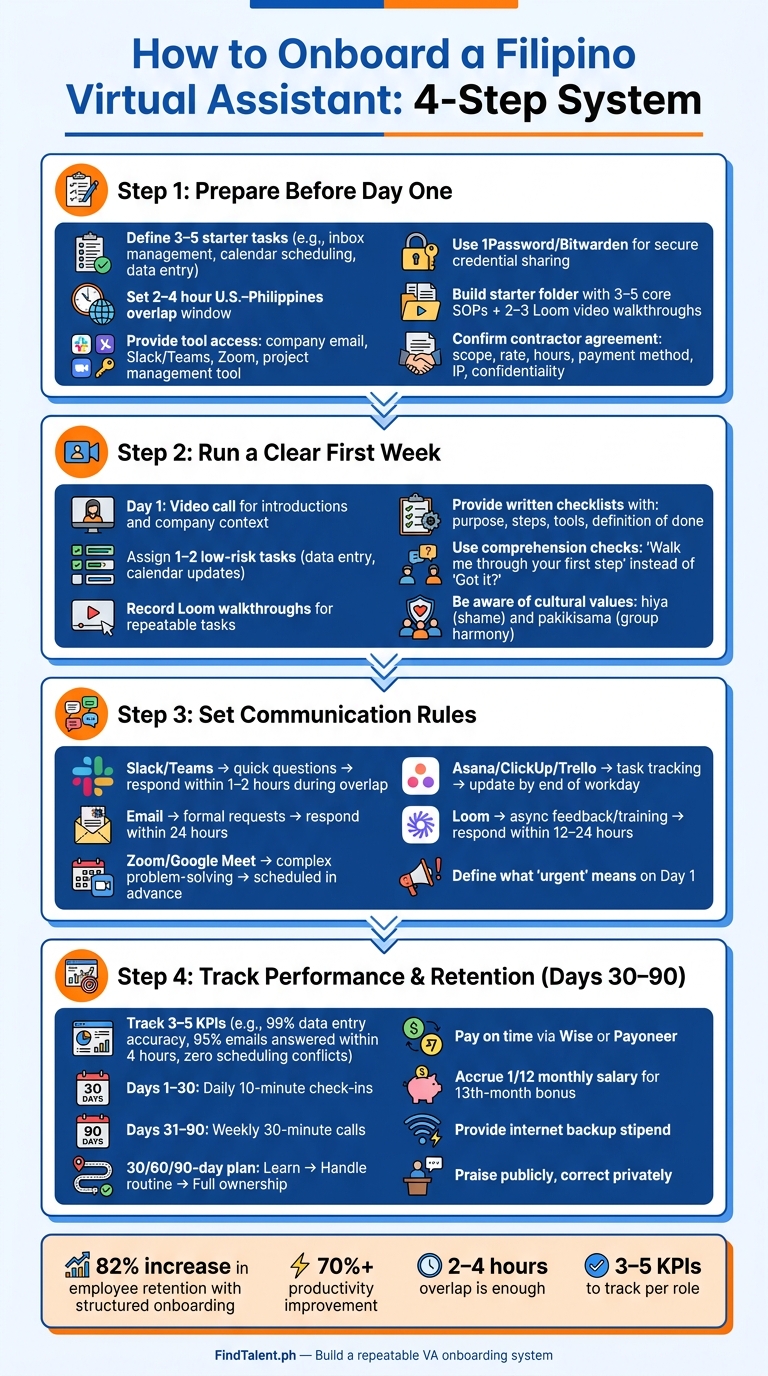
How to Onboard a Filipino Virtual Assistant: 4-Step System
How To Work With A Filipino Virtual Assistant | Managing A Virtual Assistant From The Philippines
sbb-itb-3690fed
Step 1: Prepare the role, tools, and access before day one
Before your VA starts, lock down the scope, access, and paperwork. If you need help with the hiring process, you can hire Filipino HR & Recruitment Specialists to manage the logistics. That way, day one is about getting work done, not chasing logins or sorting admin.
Define the role scope, schedule, and success metrics
Write down exactly what this person will own. In the first 48 hours, keep the focus narrow: 3 to 5 simple, repeatable tasks. Think inbox management, calendar scheduling, or data entry. That gives them an early win and keeps the first few days from feeling like drinking from a fire hose.
Set a clear overlap window for live communication. In most cases, 2 to 4 hours overlapping U.S. business hours is enough, with the rest handled async.
Then tie the work to numbers you can track. For example:
- 95% of emails responded to within 4 hours
- 100% conflict-free calendar scheduling
- 99% data entry accuracy
That makes expectations plain and makes reviews much easier later.
Once the role is clear, make sure the VA has what they need to do the job.
Set up accounts, SOPs, and secure access
Give tool access before day one, not the morning they start. That way, they can receive your welcome message and begin work without a hitch. At a minimum, set up:
- A company email address
- An invite to Slack or Microsoft Teams
- A Zoom or Google Meet link
- Access to your project management tool, such as Asana, ClickUp, or Trello
For passwords, use a manager like 1Password, Bitwarden, or LastPass. Share only the access the role needs instead of handing out admin rights. If the VA is managing your inbox, they do not need your billing dashboard too.
For documentation, build a starter folder in Notion or Google Drive with 3 to 5 core SOPs and 2 to 3 short Loom video walkthroughs. Each SOP should spell out the task, the numbered steps with screenshots, the tools needed, and the end state: what “done” looks like. That saves time and cuts down on constant back-and-forth.
With access in place, sort out pay and policy details before you hand over the first task.
Confirm pay, policies, and hiring logistics
Before day one, make sure the contractor agreement covers scope, rate, hours, payment method, IP assignment, confidentiality, and termination notice. Then confirm the rate and payment method in writing, and check that accounts like Wise or Payoneer are active on both sides before the start date so payments don’t get stuck.
It also helps to prepare a welcome packet with the company overview, team structure, communication rules, working hours, payment schedule, and emergency contacts. If the role needs live coverage, note any Philippine holidays you plan to honor and set backup steps for outages instead of penalties.
Clear pay details and policies cut down confusion once the work begins.
Step 2: Run a clear and culture-aware first week
Once access, tools, and paperwork are done, week one shifts from setup to actual work. The aim is simple: help your VA learn the business, try real tasks, and build confidence without dumping too much on them at once. This first week is where you pressure-test the basics in day-to-day work.
Start with introductions, company context, and low-risk tasks
Start day one with a video call. Introduce yourself and the team, explain what the company does, and walk through the company’s context, norms, and values. Early rapport matters a lot, especially in Filipino professional culture.
After that call, hand off one or two low-risk tasks, like data entry or calendar updates. These early assignments help you check that the workflow lines up with the role you defined. Once your VA can handle simple work with no trouble, move into repeatable training materials.
Use shadowing, recordings, and written checklists for training
Live walkthroughs help at the start, but they don’t scale well. For repeat tasks, record short Loom videos so your VA can watch them on their own schedule instead of needing the same live explanation again and again.
Pair those videos with written checklists and SOPs that lay out:
- the purpose of the task
- the steps in order
- the tools needed
- a clear definition of done
For example:
"Inbox cleared, urgent emails flagged and moved to the 'Action Needed' folder."
When your VA can see exactly what the finished result should look like, you get less back-and-forth and fewer mistakes.
Ask for clarification directly and give specific instructions
When questions come up, don’t settle for a yes-or-no reply. Two Filipino values - hiya (a sense of shame or embarrassment) and pakikisama (preserving group harmony) - can make it hard for someone to say they’re confused or ask for help.
So instead of asking, “Got it?” ask for the plan. Try prompts like:
- “Walk me through your first step.”
- “Can you restate the task in your own words?”
This makes confusion easier to spot early.
Clear deadlines and exact deliverables also cut down on mix-ups. If your instructions are direct and specific now, you’ll spend a lot less time fixing avoidable errors later.
Step 3: Set communication rules for a U.S.-Philippines remote team
After week-one training, lock in how daily communication will work. This is where a lot of remote teams either click or slowly drift into confusion. If the rules are fuzzy, your VA may not know where to send urgent questions, how long a reply should take, or when a blocker needs to be pushed up right away. Set those expectations in week one.
Assign clear channels for chat, email, meetings, and task updates
Each type of message should have ONE home. That keeps people from hunting through five apps just to find one answer.
Use Slack or Teams for quick questions. Use email for formal communication. Use Zoom or Google Meet for live problem-solving. And use Asana, ClickUp, or Trello for task tracking.
During your overlap window, set a 1–2 hour chat response standard. Outside that window, switch to async updates.
| Communication Method | Best Use Case | Expected Response Time |
|---|---|---|
| Slack / Teams | Daily check-ins, quick questions, urgent blockers | Within 1–2 hours during overlap |
| Formal requests, long-form documentation, external communication | Within 24 hours | |
| Zoom / Google Meet | Weekly planning, 1:1s, complex problem-solving | Scheduled in advance |
| Asana / ClickUp / Trello | Task tracking, deadlines, SOP storage | End of workday |
| Loom | Process walkthroughs, async feedback, training | Within 12–24 hours |
Define what urgent means on day one too. If you skip that part, one of two things usually happens: your VA pings you for small stuff that could wait, or they sit on a real problem until the next check-in. Neither is fun.
Adjust feedback style for indirect communication and hierarchy
Once the channel rules are set, decide how corrections and questions should be handled. Be direct about this: give clear permission to ask questions and flag blockers.
When you need to correct something, do it privately. Explain the issue, spell out the impact, and end with the next step. That makes the message easier to act on and less likely to feel personal.
After verbal feedback, send a short written recap in Slack or email. Treat it as a feedback record your VA can look back on later, not just one more training note.
Step 4: Manage performance, retention, and long-term growth
Once communication is in place, the next job is simple: keep performance steady and build for the long haul.
Track results with simple KPIs and regular check-ins
Choose three to five KPIs tied to the role, track them in a shared Google Sheets or Notion dashboard, and review that same dashboard in every check-in.
For the first 30 days, hold daily 10-minute check-ins. After that, switch to weekly 30-minute calls.
For an executive VA, those KPIs might look like this:
- 99% accuracy on data entry
- 95% of emails answered within 4 hours
- Zero scheduling conflicts per week
For a customer support VA, you might track response time, ticket resolution rate, and customer satisfaction scores.
Keep the check-ins tight. Start with one clear win, then go straight to blockers and fixes. Use the same questions each time:
What is blocking you? What was confusing this week? What should we change in the process?
A simple 30/60/90-day plan also makes a big difference. In Month 1, the Filipino virtual assistant learns the role and follows SOPs. In Month 2, they handle routine work with little supervision. In Month 3, they take full ownership of the role. Structured onboarding can increase employee retention by 82% and boost productivity by over 70%.
Support retention with consistency, recognition, and local awareness
Late or irregular payments are cited as the main reason skilled Filipino virtual assistants leave a role. So this part matters a lot: pay on time, every time. Wise and Payoneer are common choices for steady USD transfers with lower fees and better exchange rates.
Money is only part of it, though. People stay when the job feels steady. A stable schedule, clear expectations, and a manager who notices good work can make a big difference. If someone does solid work, say so in the team channel. If there’s a problem, handle it privately in a 1-on-1.
It also helps to plan around local norms in the Philippines. Account for Philippine holidays. Set aside a pro-rated 13th-month bonus each month. And since power and internet outages can interrupt work, think about an internet backup stipend for a second ISP or a UPS power station.
| Retention Factor | Common Challenge | Concrete Solution |
|---|---|---|
| On-time USD payments | Currency fluctuations and transfer fees | Use Wise or Payoneer for consistent, low-cost transfers |
| 13th-month pay | Year-end budget pressure | Accrue 1/12 of monthly salary each month |
| Internet/power reliability | Unexpected outages disrupting work | Provide a stipend for a backup ISP or UPS power station |
| Recognition | Cultural tendency toward silence | Praise publicly in team channels; correct privately in 1-on-1s |
Use onboarding lessons to improve the next hire
After the first 90 days, look back at what actually happened. Which SOPs caused the most confusion? Where did training drag? Which tasks took longer to hand off than you expected?
Write down what slowed onboarding, update the SOPs, and carry those fixes into the next hire.
Conclusion: Build a repeatable onboarding process that helps your VA succeed
Good onboarding works best when it becomes a system you can use again and again. With each hire, you tighten it up a bit more. The idea is simple: give clear direction before day one, add structure in week one, and stay consistent after that.
During the first 90 days, document processes with your VA as they learn the role. That way, each task turns into training material you can use again. Once a process is written down, track it with a few simple KPIs. This helps train your current VA and gives you reusable SOPs for the next hire.
If you need verified Filipino virtual assistants, FindTalent.ph uses AI-powered matching to connect you with qualified talent. Build the system once, refine it after each hire, and your next onboarding will be easier than the last.
FAQs
What should I prepare before day one?
Before day one, get the signed contractor agreement locked in. That should cover the project scope, payment terms, and confidentiality requirements. Set up the payment method too, and make sure both accounts are verified so there are no delays later.
You’ll also want to prepare role-limited access to the main tools the contractor needs. Alongside that, put together a welcome folder with the basics:
- Your company mission
- Team structure
- Working hours
- 3 to 5 core process documents or Loom walkthroughs
This gives the contractor what they need to start work without getting lost on day one.
How do I train a Filipino VA effectively?
Train a Filipino virtual assistant with clear instructions, documented SOPs, screen-recorded walkthroughs, and a steady feedback loop. That setup gives them something concrete to follow instead of forcing them to guess. Regular check-ins also help you spot small issues before they turn into bigger problems.
Be supportive with feedback. Invite questions early and often so they feel comfortable speaking up when something isn't clear. It also helps to pair them with a buddy who can show them how your team works day to day, from communication habits to internal processes.
If the work misses the mark, don't just jump in and redo it yourself. Look at the system first. In many cases, the problem isn't effort - it's unclear instructions or weak documentation. Tighten the brief, update the SOP, or record a better walkthrough so the next task goes more smoothly.
What KPIs should I track first?
Start with KPIs tied straight to your virtual assistant’s main duties and service-level agreements. Keep your eye on metrics such as:
- email response time
- data entry accuracy
- meeting scheduling success
- social media posting consistency
If you’re hiring through FindTalent.ph, set these targets in the first week. Then use a shared dashboard to track goals, task completion, and deadlines. As your assistant gets more familiar with your workflow, you can tighten those targets and expect more from the role.